Summary
Wireless presenter remotes are a staple accessory for lecturers who use PowerPoint and Google Slides for course lectures and special events. This illustrated article compares several brands and models commonly encountered in university classrooms, conference rooms and auditoriums.
Body
The Logitech R800 wireless presenter remote
...is the standard for Google and PowerPoint slide shows in LSA-supported spaces on central campus

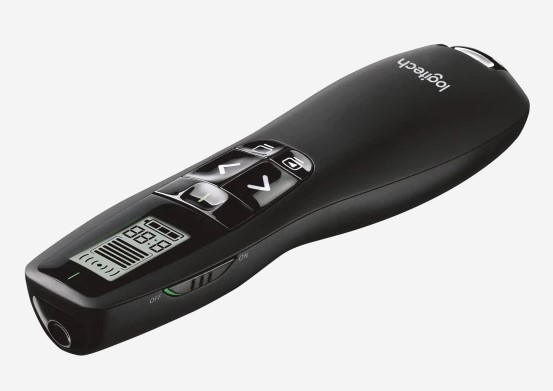
-
Note power switch on side of unit - green means it's on.
-
Its receiver, commonly referred to as a "dongle" or "fob", is stored in a compartment at the bottom of the remote.

-
Unless receiver is plugged into a computer or podium monitor's USB port, the remote will not function.

- Brand new R800s come with a removable transparent covering over the LCD display window, and a white paper ribbon protruding from the battery chamber.
- This prevents one of the two AAA batteries from touching the contacts.

- As soon as the paper is removed, you can feel the remote vibrate into "on" mode.


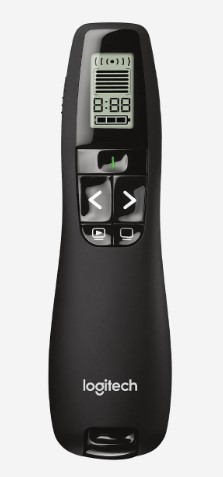
- Note the importance of No.4, the "black screen" button.
- Presenters who accidentally blacken the screen while talking maybe be surprised that their slide has "disappeared".
- The remedy of course is to press it again.
- Options 5 and 6 control a timer. To employ this rarely used feature, consult the user manual by following this link:
https://www.logitech.com/assets/65045/2/r800-laser-presentation-remote.pdf
Non-standard remotes
- The Logitech R400 is smaller and displays a battery power indicator on start-up.

The Trouble with Kensingtons
- In 2023, Logitechs attained unexpected prominence as LSA Technology Services was forced to begin removing all Kensington brand presenter remotes from LSA-supported classrooms and auditoriums, after it was determined that Kensingtons were causing podium computers to shut down, sometimes in the middle of PowerPoint lectures.
- Please note that the Kensington-triggered shut down issue seems only to have occurred with Windows computers installed in our standard classroom podiums.
- Because Kensingtons may still be encountered in peripheral and non-LSA spaces, this article's descriptions of Kensington remotes are being retained for informational purposes.
- The Kensington Wireless Presenter Pro is equipped with a green laser pointer for greater visibility in larger rooms.
- Its simple button layout follows the standard basic pattern of pointer, forward, reverse and black screen. There is no display indicating battery power.

- The Kensington Presenter Expert Wireless Cursor Control is a fancy combination of laser pointer, slide advancer and mouse.
- The ability to manipulate its centrally located cursor control knob (referred to by the manufacturer as a "joystick") is an acquired skill.

The most venerable vintage Kensington
Unlike more recent presenter remotes, the venerable Kensington 33374 has no on-off switch.
It automatically powers on when the dongle receiver is removed from the bottom of the unit.
Until the dongle is replaced, the remote will continue to draw power from the batteries.
This older model has been gradually phased out, but may still turn up in classrooms, conference rooms and auditoriums across campus.


For Assistance Call 734-615-0100 [Prompt 1]